

A seo migration checklist helps you decide whether a proposed website change is ready to launch, not merely whether a developer has finished the ticket list. For a small business, the risk may be losing local landing pages or enquiries. For an e-commerce brand, it may be breaking category paths, product URLs, faceted navigation, or international versions. For an agency, the job is often to give a client a defensible go/no-go decision.
This guide treats migration as a controlled change to a search system. It covers domain changes, URL restructures, platform replacements, redesigns, protocol changes, and combinations of these. The central rule is simple: preserve useful discoverable URLs where possible; when a URL must change, create and test a clear replacement before launch.
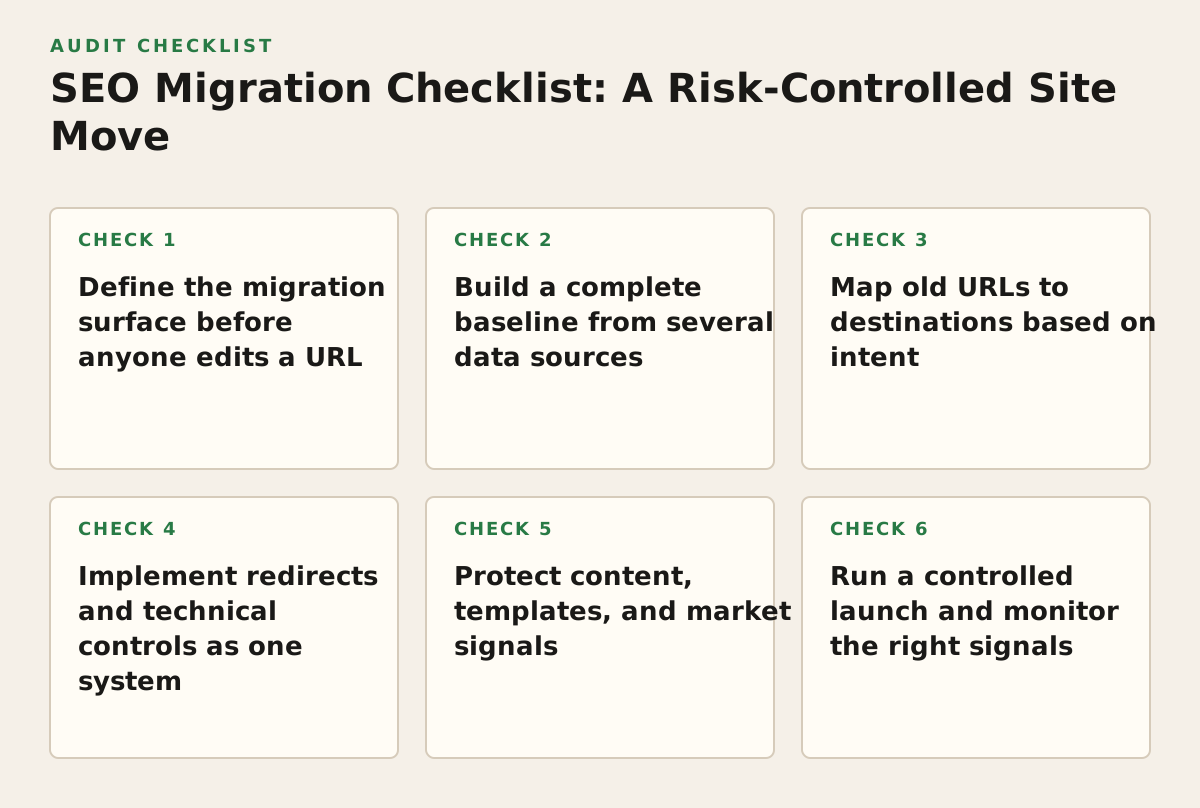
1. Define the migration surface before anyone edits a URL
When this applies: Use this planning step for every migration, including a “small” redesign. A platform switch can alter URL paths, rendering, canonicals, pagination, internal links, structured data, and response codes even when the domain remains unchanged.
Why it works: Search engines evaluate many connected signals rather than one page title. Separating the change types makes risk visible. A protocol change from HTTP to HTTPS is not the same operational problem as changing every product URL, and neither is identical to moving from one domain to another.
Classify the change and assign an owner
- Domain or subdomain move: example.com to newbrand.com, or shop.example.com to example.com/shop.
- URL structure change: /services/seo/ becoming /seo-consulting/.
- Platform migration: a new CMS, commerce platform, hosting stack, or rendering architecture.
- Design or template change: page layouts, navigation, content blocks, and metadata change while URLs remain stable.
- International expansion: new country or language paths, domains, hreflang relationships, and market-specific content.
- Consolidation: several thin or overlapping pages become one stronger destination.
Assign one accountable owner for URL mapping, one for technical implementation, one for analytics, and one for approval. An agency supporting a client should also name the person who can stop deployment. Without that authority, a checklist becomes a record of observations rather than a control mechanism.
Write the success definition and the stop conditions
Do not define success only as “the new site is live.” Record what must remain true after launch:
- Priority organic landing pages resolve to the intended destination.
- Important old URLs either remain live or redirect to a genuinely relevant replacement.
- Canonical, robots, sitemap, and internal-link signals agree.
- Conversion tracking still identifies leads, purchases, calls, or other business outcomes.
- International and local pages remain discoverable in the intended markets.
Failure mode: Treating every historical URL as equally important creates a huge mapping project while hiding the pages that generate revenue or qualified leads.
Implementation example: A Dhaka-based B2B consultancy moving to a new CMS could define its priority set as service pages, location pages, case studies, contact paths, and the top organic blog entries. Product filters and old tag archives may be excluded if they have no useful replacement, provided they are handled deliberately rather than abandoned accidentally.
2. Build a complete baseline from several data sources
When this applies: Do this before design freeze or development handoff. The baseline is especially important for sites with seasonal traffic, large inventories, multiple language versions, or a history of ranking losses.
Why it works: No single export shows the whole site. A crawler reveals links and directives, analytics shows business activity, Search Console shows search visibility, and server logs can expose requests that ordinary crawlers never discover.
Collect the old-site evidence
Export or preserve the following from the current site:
- All indexable URLs discovered through a crawl, XML sitemaps, analytics, and Search Console.
- Organic clicks, impressions, landing-page sessions, conversions, revenue, and assisted conversions.
- Inbound links and referring pages for URLs with meaningful authority or referral value.
- Current status codes, title tags, meta descriptions, canonicals, robots directives, and structured data.
- Internal links from navigation, breadcrumbs, related content, product grids, and body copy.
- Images, PDFs, downloadable guides, feeds, and other assets that receive search traffic.
Use a crawl with JavaScript rendering if the current site depends on client-side navigation or content loading. Sample server logs if available. They can reveal old URLs requested by search engines, customers, partners, or bookmarked links, including URLs that are absent from your navigation.
Separate business value from crawl volume
Score pages using a practical classification rather than a single traffic number. A page with modest traffic but a high-margin enquiry may deserve more protection than a popular informational page that never assists a sale.
| Priority | Typical evidence | Migration action | Review decision |
|---|---|---|---|
| Critical | Revenue, qualified leads, strong links, or strategic service intent | Assign a named destination, test manually, and monitor separately | Do not launch with unresolved mapping or tracking |
| Important | Consistent organic visibility, useful content, or supporting internal links | Map to the closest relevant page and validate at scale | Resolve unexpected status, canonical, or content changes |
| Review | Duplicate, thin, obsolete, or low-value URL | Consolidate, improve, retain, or retire based on intent | Document why no direct replacement exists |
| Technical | XML sitemap, feed, image, PDF, API, or utility path | Check whether it should remain accessible and referenced | Confirm the new system handles it intentionally |
Failure mode: Using only the sitemap as the inventory. Sitemaps are valuable discovery inputs, but they do not guarantee that every historically linked, indexed, or commercially important URL appears there.
Implementation example: An online retailer could combine a crawl, its product catalogue, twelve months of organic revenue data, Search Console landing pages, and backlink exports. If a discontinued product has links and recurring demand, the destination might be a relevant replacement product or category—not an automatic redirect to the homepage.
For pages whose titles or descriptions will be rewritten during the move, run the final copy through a meta description length checker before publishing. Treat that tool as a review aid, not as permission to truncate useful language merely to satisfy a character target.
3. Map old URLs to destinations based on intent
When this applies: URL mapping is mandatory whenever paths, domains, products, categories, or content groupings change. It is also useful for a redesign that claims to preserve URLs, because templates can quietly generate alternate paths.
Why it works: A redirect is most useful when it resolves the visitor’s underlying need. A technical response alone cannot make an irrelevant destination relevant. The map should therefore describe the old URL, its content intent, the new destination, the redirect status, and the reason for the decision.
Use one-to-one mapping where the content survives
Start with exact matches. If /services/technical-seo/ becomes /technical-seo-consulting/, map it directly. If the old page is split into several new pages, choose the destination that preserves the primary intent and place clear internal links to the related pages.
For consolidation, compare:
- Search intent and audience rather than wording alone.
- Commercial role, such as product, category, service, or educational support.
- Backlink context and referring-page expectations.
- Conversion path and the next action a visitor needs.
- Language, country, currency, and product availability.
Google’s guidance on site moves recommends preparing URL mappings and using permanent redirects when URLs change; its current documentation is the reference point for domain and URL-change planning in 2026: Google Search Central’s site-move documentation.
Choose between retain, redirect, improve, and retire
Every old URL should receive one explicit disposition:
- Retain: the URL remains and its content is still appropriate.
- Redirect: a close replacement exists and the old address should send visitors there.
- Improve or consolidate: the content is valuable but should be merged or rewritten.
- Retire: no useful replacement exists and the business has a documented reason to remove it.
Do not redirect every retired page to the homepage. That may create a poor user experience and makes it harder to distinguish a meaningful migration from a collection of unrelated redirects.
Failure mode: Creating redirect chains because the map uses an old intermediate URL. If A redirects to B and B redirects to C, update the rule so A goes directly to C.
Implementation example: Suppose a Bangladeshi apparel store changes /women/sarees/red-saree.html to /collections/red-sarees/. A direct permanent redirect is appropriate if the new collection serves the same shopping intent. A discontinued product page should instead map to a comparable product or the relevant collection, with a documented review if neither exists.
4. Implement redirects and technical controls as one system
When this applies: Use this phase in staging and repeat it in production immediately after deployment. It matters most when multiple teams control the CDN, web server, application, CMS, and analytics container.
Why it works: Search engines and users encounter the site through HTTP responses, rendered HTML, links, and discovery files. A redirect rule that works at the server can still be undermined by an old canonical, a blocked staging path, or an internal link pointing to the former URL.
Prefer direct, permanent redirects
For a URL that has moved permanently, configure a direct 301 or another appropriate permanent redirect at the server or edge layer. HTTP semantics define 301 as “Moved Permanently,” while also allowing the user agent to update a link reference in some circumstances; see RFC 9110’s 301 definition. MDN’s practical reference also explains the distinction between 301 and temporary redirect responses: MDN’s HTTP 301 documentation.
Keep the redirect logic readable and testable. Avoid broad regular expressions unless the old and new patterns are genuinely equivalent. Preserve meaningful query parameters when they affect product selection, campaign attribution, or search functionality; remove tracking parameters only when you understand their business use.
Audit the complete technical signal set
On the new site, check each template type for:
- Self-referencing or intentionally cross-page canonical URLs.
- Robots meta directives and X-Robots-Tag headers.
- Indexable status and accessible rendered content.
- Internal links using the final URLs rather than redirecting URLs.
- XML sitemap entries containing only the preferred, indexable URL set.
- Correct hreflang relationships for language and country variants.
- Structured data that describes the visible page content and entity.
- Consistent HTTP-to-HTTPS and hostname normalization.
Google explains that canonicalization helps select a representative URL among duplicate or near-duplicate pages, but a canonical hint is not a substitute for a correct redirect or a coherent site architecture: Google’s canonicalization documentation.
Generate a new XML sitemap containing the intended canonical URLs, then submit or reference it through the appropriate webmaster tools and robots.txt. Google describes sitemaps as a way to provide information about pages, videos, and other files, while noting that sitemap inclusion does not guarantee indexing: Google’s sitemap overview.
Failure mode: Blocking the old site in robots.txt to “force” the move. If crawlers cannot fetch old URLs, they may not see the redirects. Keep redirecting old URLs reachable long enough for the move to be processed, and remove obsolete rules only under a deliberate retention policy.
Implementation example: A platform migration might route /old-category/* to a mapping table at the edge, update all product-card links to the new paths, generate a new sitemap, and keep the old domain responding with direct redirects. The QA script should test status, location, final status, canonical, and indexability—not just whether a browser eventually displays a page.
5. Protect content, templates, and market signals
When this applies: This category matters when the migration includes a redesign, translation, international expansion, JavaScript framework, or major content rewrite. A URL can remain unchanged while its search meaning changes substantially.
Why it works: Stable URLs do not preserve value if the new page removes the content, links, structured data, or conversion path that made the old page useful. Template-level changes can affect hundreds or thousands of URLs at once.
Compare old and new pages by template
Choose representative samples from service, product, category, blog, location, author, and legal templates. Compare:
- Visible primary content and heading hierarchy.
- Title, meta description, image alt text, and structured data.
- Breadcrumbs, navigation, related links, and pagination.
- Availability, price, stock, shipping, contact, and booking information.
- Language, currency, phone number, address, and local service area.
For an international company targeting Bangladesh, confirm that the Bangladesh page does not accidentally inherit another market’s currency, delivery promise, phone number, or canonical. For a local service company, confirm that the new template still exposes the areas served and a working enquiry route.
Keep performance work tied to user tasks
Do not postpone all performance validation because the migration is “mostly SEO.” Test real user journeys: landing on a category, filtering products, opening a menu, submitting a form, completing checkout, and returning to a previous page. A visually faster homepage does not compensate for a broken purchase or lead flow.
Failure mode: Launching a JavaScript-rendered replacement that displays content in a browser but serves an incomplete initial response, blocks important assets, or omits links from the rendered page.
Implementation example: An agency rebuilding a client’s location pages can preserve the URL and copy intent while replacing the template. It should crawl the rendered staging pages, verify visible address and service-area content, check internal links to nearby locations, and test the enquiry form from a mobile device before approval.
Use an internal link opportunity tool during the content and template review to identify relevant links from established pages to newly created or retained priority URLs. Add links where they help users navigate, not simply to increase the number of links on a page.
6. Run a controlled launch and monitor the right signals
When this applies: This applies to launch day and the monitoring period afterward. It is especially important for e-commerce, publishing, and lead-generation sites where a technical defect can affect revenue before rankings visibly change.
Why it works: Pre-launch testing catches known defects; live monitoring catches environmental defects. DNS, CDN, cache, permissions, third-party scripts, payment flows, and production-only rewrite rules can behave differently from staging.
Use a launch sequence with named checks
- Freeze the final URL map, content, analytics configuration, and redirect rules.
- Crawl the staging site and record unresolved links, blocked assets, unexpected canonicals, and non-indexable templates.
- Test a sample of critical old URLs and confirm direct final destinations.
- Confirm production DNS, HTTPS certificates, CDN behavior, robots.txt, sitemaps, and access controls.
- Deploy during a staffed period when developers, analysts, and decision-makers are available.
- Run automated smoke tests immediately, then manually test priority journeys.
- Compare live crawl results with the baseline and log every material difference.
Monitor visibility and business outcomes separately
Use at least four monitoring views:
- Technical: redirect failures, server errors, blocked crawling, latency, broken canonicals, and sitemap errors.
- Search: impressions, clicks, indexed-page patterns, queries, landing pages, and country or device changes.
- Business: leads, calls, transactions, revenue, checkout completion, and qualified conversion rate.
- User behavior: engagement paths, form errors, internal search, and support requests about missing content.
Segment reports by old versus new URL, directory, device, country, and template. A sitewide average can hide the fact that product pages are healthy while service pages or Bangladesh traffic have failed.
Failure mode: Reacting to normal reporting delay by changing URLs or content again. Record the baseline, annotate the deployment, investigate by template and status code, and make one controlled fix at a time.
Implementation example: After a domain migration, an agency can maintain a dashboard with top old URLs, their final destinations, organic landing-page trends, 404 counts, organic conversions, and country segments. A sudden increase in 404s within one directory is actionable; a small fluctuation in total clicks without a technical pattern is not automatically evidence that the migration failed.
7. Turn the checklist into a repeatable implementation plan
When this applies: Use this sequence for a planned migration, and adapt it for an urgent recovery after a ranking or traffic loss. The order prevents teams from polishing templates before they know which URLs and business actions must be protected.
Phase 1: Discovery and decision
- Define the migration type, markets, templates, systems, owners, and launch constraints.
- Export crawl, analytics, Search Console, backlink, sitemap, catalogue, and log data.
- Classify URLs by business value, search intent, technical role, and replacement status.
- Set a starting policy for what requires manual review. This is an illustrative governance policy, not a universal threshold: manually review every critical URL, every template change, and every redirect with no close content match.
Phase 2: Mapping and build
- Produce the old-to-new URL map, including retain, redirect, consolidate, improve, and retire decisions.
- Implement direct permanent redirects and eliminate known chains and loops.
- Build new templates with correct canonicals, metadata, internal links, structured data, language signals, and conversion paths.
- Generate the new sitemap and update internal references to final URLs.
Phase 3: Quality assurance
- Crawl staging with and without JavaScript rendering where relevant.
- Test priority old URLs, random samples, parameter variants, assets, PDFs, and legacy directories.
- Compare old and new template samples for visible content, intent, links, and market details.
- Validate analytics, consent behavior, forms, calls, purchases, feeds, and dashboard annotations.
- Record unresolved defects with an owner and a go/no-go decision.
Phase 4: Launch and recovery controls
- Deploy during a staffed window and confirm the production environment immediately.
- Run smoke crawls, log checks, Search Console checks, and business-journey tests.
- Monitor errors, redirects, indexing signals, organic landing pages, and conversions by segment.
- Fix high-impact technical defects first, then investigate content and relevance changes.
- Retain the old-to-new map, baseline, crawl files, and launch notes so future diagnosis is possible.
Recommended decision: approve the migration only when the highest-value URLs have an intentional destination, the redirect and canonical systems agree, production journeys work, and someone is responsible for post-launch monitoring. If those conditions are not met, delay the launch or reduce its scope rather than combining a platform change, URL rewrite, content rewrite, and international expansion into one unmeasurable event.
For a migration that affects rankings, leads, or multiple markets, Mr Haq can help with technical SEO planning, URL mapping, validation, analytics, and post-launch diagnosis through Mr Haq.
Authored with NotFair SEO
