

An seo template is a reusable worksheet for deciding what a page should help someone do, what evidence it needs, and how you will check whether it works. Use the template below to turn a keyword or business need into a page brief, then adapt its sections for a service page, product category, local landing page, or recovery project. The aim is not to make every page look alike; it is to make important decisions visible before writing or implementation begins.
Choose the template according to the page’s job
Start by naming the job the page must do, not by choosing a document format. A service page should help a qualified buyer understand the offer and take a next step. An ecommerce category page should help shoppers narrow a selection. A local page needs to make the relevant location and service clear without creating near-duplicate pages for places the business does not serve.
Why this works: page type shapes the information people need and the action that makes sense. When the template matches that job, a writer can distinguish required content from optional decoration. For a small business targeting several customer types, separate the page’s primary audience from secondary audiences rather than trying to give every visitor equal prominence.
Make the decision explicit
- Service page: What problem is addressed, who is a fit, what is included, and how can a prospect ask a useful question?
- Product or category page: What attributes help someone compare, filter, or choose? Which details belong on product pages instead?
- Local page: What verifiable information is specific to this location, and is there a genuine reason for a separate page?
- Recovery page review: Is this page still useful and accurate, or should it be updated, consolidated, redirected, or removed?
Failure mode: treating a page type as a layout recipe. Copying the same blocks across every location or service page can create repetition without answering local or offer-specific questions. As an illustrative example, a consultancy serving multiple markets might share a consistent page structure while writing distinct evidence, regulations, and customer questions into each market page. Do not imply a local office or service availability unless the business can verify it.
Define the searcher’s intent before drafting
For each target query, write down the likely task behind it: learn, compare, find a provider, or complete a purchase. The query is a clue, not proof that one format will satisfy every searcher. Review current search results for recurring formats and unanswered questions, then check them against what the business can truthfully provide.
Google recommends creating helpful, reliable, people-first content and asks publishers to consider whether content adds original value and demonstrates relevant experience. Use that guidance as a quality test, not a shortcut to a ranking promise: Google’s helpful content guidance.
Turn intent into a briefable question
Write one sentence in the form: “A [specific audience] needs to [task] because [decision or constraint].” For an ecommerce brand, that might be: “A buyer comparing water-resistant commuter bags needs to distinguish capacity and closure types before choosing.” It is more useful than “rank for commuter bags” because it points to information a page can actually supply.
- List the questions that would change the reader’s decision.
- Separate questions the page can answer from those that need a specialist, salesperson, or another page.
- Record uncertainty instead of filling gaps with broad claims.
Failure mode: writing to a keyword list without resolving audience or task. That produces pages that repeat terms but leave buyers unsure what to do next. For a business recovering from lost visibility, compare the page’s current purpose and usefulness with its intended query before rewriting it; a traffic decline alone does not establish the cause.
Map queries to pages before expanding the site
Assign each important query or tightly related query group to one best-fit page. This does not mean every keyword needs a unique URL. If several searches express the same need, one well-structured page may serve them; if they reflect different decisions, separate pages may be warranted. The distinction prevents both thin page proliferation and pages that try to serve incompatible intents.
Why it works: a page map makes overlap visible before writers create competing URLs. It also gives teams a clear owner for updates. Record the proposed URL, audience, intent, and next action together; keyword volume alone cannot tell you whether a page is commercially relevant or supportable.
Prioritize with a decision rule
Use a simple review order rather than pretending to calculate a precise opportunity score from incomplete data:
- Business fit: does the query relate to an offer or audience the organization can genuinely serve?
- Reader need: is there a distinct task or decision the page can help with?
- Evidence: can the business support the page with accurate details, examples, or expertise?
- Page action: is there a sensible next step after the reader gets an answer?
For query ideas, Google Ads Keyword Planner can help generate keyword ideas and estimates; treat estimates as planning inputs, not a guarantee of organic visits. See Google Ads Keyword Planner guidance. Compare candidates with your own audience, offer, and search-result review before assigning them to URLs.
Failure mode: creating one page per minor wording variation. For example, slightly different phrases for the same service may not justify separate pages if the audience, decision, and useful content are identical. Consolidate where the reader’s job is the same; separate only when the page must answer materially different questions.
Build useful page content, not a checklist of keywords
Once a page has a defined job, plan the evidence and information needed to complete it. A heading outline should reflect the reader’s decision sequence, not force a keyword into every heading. On a service page, that might mean the problem addressed, scope, process, fit, limitations, and next step. For a category page, it might mean product differences, selection criteria, and links to relevant products or buying guidance.
Evidence earns trust: use accurate specifics such as named methods, clear inclusions, product attributes, or examples the business can verify. Where a claim depends on location, availability, qualification, or a result, confirm it with the responsible person before publishing. If the evidence is absent, remove or qualify the claim rather than dressing it up as certainty.
Write titles and descriptions for clarity
Make the page title specific enough to distinguish it from neighboring pages and accurately represent the page. Google may generate title links from multiple page signals, so a title element is a useful input, not a guarantee of the exact displayed wording; see Google’s documentation on title links. A meta description should summarize the page’s distinctive value in natural language, not repeat a string of target terms. Google may use page content instead when generating snippets: Google’s snippet guidance.
For an existing page, review the meta description length checker as a related resource, but make the final wording decision based on accuracy and usefulness, not a character count alone.
Failure mode: adding generic claims—“best,” “leading,” or “guaranteed”—without evidence. A more useful alternative is a precise, verifiable description of what the page covers and who it is for. For a product category, explain a real distinction shoppers can use; for a service page, state the actual scope rather than implying outcomes the business cannot promise.
Protect the page with technical and linking checks
A strong brief cannot compensate for a page that is inaccessible to search engines or difficult for people to navigate. Before publication, check that the intended URL loads, the main content is present, internal links point to relevant destinations, and the page is not accidentally blocked or marked for exclusion. Google explains that robots.txt controls crawling and is not a reliable way to keep a URL out of search results; check the appropriate indexing controls for the outcome you intend. See Google’s robots.txt documentation.
Use a release checklist
- Confirm the canonical destination and remove accidental staging or test references.
- Check that navigation and contextual links help visitors reach related information.
- Verify that page content, title, and intended indexing settings agree.
- Review mobile rendering and important interactions, especially for product filters or forms.
Internal links should support a next useful step, not exist merely to increase link counts. A related resource is the internal link opportunity tool. For a site-wide review, ask whether each link’s destination is relevant to the sentence and whether the destination itself is accessible.
Failure mode: treating “published” as “eligible and discoverable.” A page can be live for a person while still having an unintended technical setting or no useful path from other pages. For a large or frequently changing site, assign an owner to verify release settings rather than relying on a writer’s visual review alone.
Measure the outcome that matches the page’s job
Choose a primary measure before launch or revision. For an informational page, that could be qualified organic visits or meaningful progression to related content. For a service page, examine relevant search impressions and visits alongside the inquiries the business can actually attribute. For ecommerce, connect organic landing-page performance to product discovery and sales reporting where the available analytics setup permits. Traffic is not the same as business value; a page can attract visits from people who are not a fit.
Google Search Console’s Performance report provides search results data such as clicks, impressions, click-through rate, and average position, with filters for dimensions including queries and pages. Use it to compare a page against its own prior state and inspect which searches are surfacing it, not as proof that a particular edit caused a change. See the Search Console Performance report documentation.
Make the review actionable
- Record the date, URL, target audience, and change made.
- Check whether the page is receiving impressions for relevant queries.
- Inspect whether clicks lead to the intended next action or reveal a mismatch.
- Decide whether to keep, clarify, expand, consolidate, or technically investigate the page.
Failure mode: changing titles, copy, links, and page structure at once, then attributing any movement to one edit. Keep a change log and make the next adjustment based on a specific observation. If several changes must ship together, record that limitation; do not claim causal certainty from a before-and-after comparison alone.
Copyable SEO page brief template
Copy this worksheet for one URL at a time. Fill every row that affects the page’s purpose; write “unknown” where the business needs to verify a detail. This keeps assumptions visible instead of quietly turning them into published claims.
| Field | Question | Your answer |
|---|---|---|
| Page and owner | Which URL or proposed page is this, and who verifies it? | [URL or proposed page; owner] |
| Audience and task | Who is the main reader, and what decision or task do they need to complete? | [Describe the buyer and task] |
| Target query group | Which related searches express that same need? | [Add the main query and close variants] |
| Business fit | What genuine offer, product, or information connects this page to the business? | [State the verified fit; note unknowns] |
| Evidence and constraints | What facts, examples, limitations, or approvals must support the content? | [List evidence and who confirms it] |
| Page answer and structure | What must the page explain first, and what supporting sections follow? | [Draft the answer and section outline] |
| Next step | What relevant action can a reader take after getting an answer? | [Name the action or explain why none fits] |
| Technical checks | What URL, indexability, mobile, and internal-link checks are required? | [List checks and responsible owner] |
| Measurement | Which search and business signals will inform the next review? | [Name measures, source, and review date] |
Worked example: illustrative ecommerce category page
Page and owner: proposed category page for commuter backpacks; ecommerce content lead verifies the product details. Audience and task: a shopper comparing bags for a daily commute needs to choose based on capacity and closure. Target query group: searches that indicate a need for commuter backpacks, grouped only after checking whether they share that choice task. Business fit: the page should include only products the retailer confirms are in the category. Evidence and constraints: confirm capacity, materials, closure type, and current product details with the product data owner; do not invent water resistance. Page answer and structure: introduce the category, explain useful comparison attributes, then link shoppers to relevant products. Next step: browse the confirmed products. Technical checks: verify the live category URL, mobile filters, and product links. Measurement: review relevant search queries and organic visits alongside available product interaction or sales data.
Adapt the fields: for a local page, add the location and evidence that makes it meaningfully distinct; verify any claims about service coverage. For a service page, replace product attributes with scope, fit, process, and limitations. If an answer is unknown, assign someone to verify it before publication or omit the claim.
Implement the template in a controlled sequence
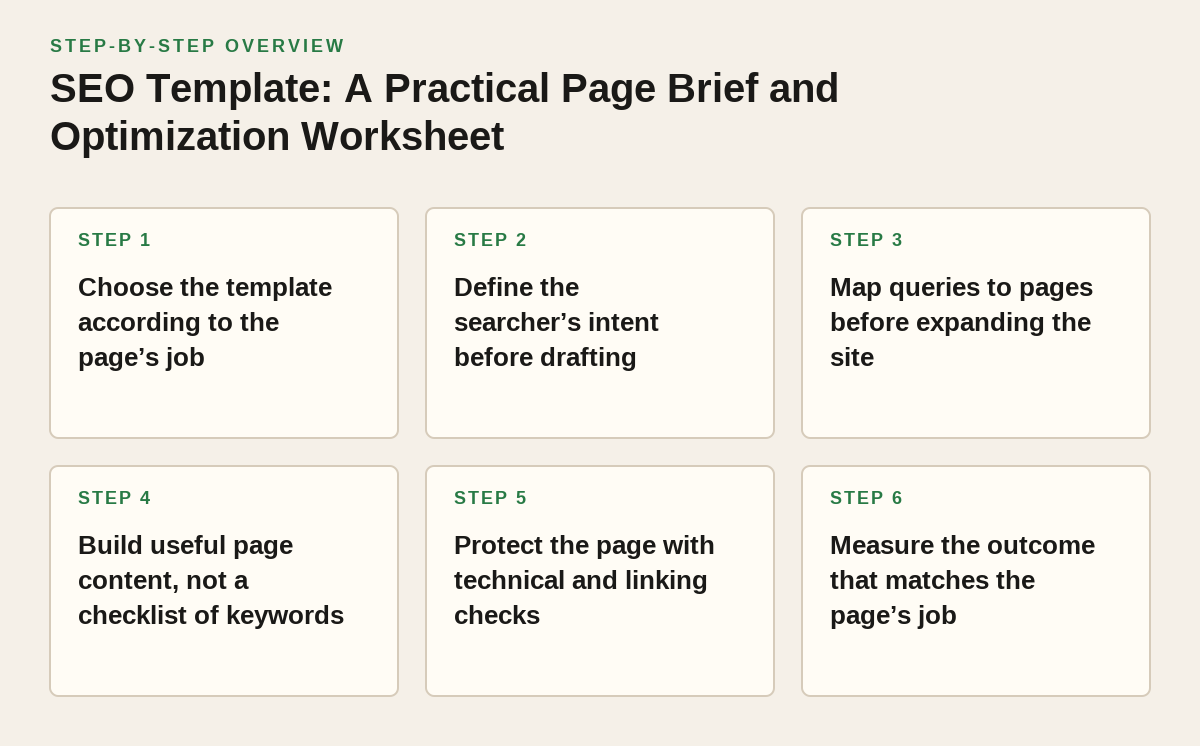
- Choose the page: select a business-relevant URL or proposed page with a clear audience and task. Do not start by generating dozens of keyword-led URLs.
- Complete the brief: group queries by shared intent, record evidence and unknowns, and decide whether the existing page can satisfy the need.
- Approve the page map: check for overlap with existing URLs. Consolidate when the intended audience and decision are the same; create a separate page only when it serves a distinct need and has sufficient substance.
- Draft and verify: write the direct answer and decision-supporting sections, then ask the person responsible for the offer or product to check factual claims and constraints.
- Run release checks: confirm the URL, indexing settings, internal links, and mobile experience before treating the page as ready.
- Review and decide: compare relevant search and business signals, document changes, and choose a specific next action instead of rewriting the page on instinct.
If your team needs support turning SEO priorities into a practical strategy, Mr Haq provides SEO consulting across technical SEO, content strategy, local SEO, link building, analytics, E-E-A-T, and AI search optimization. Learn more about SEO consulting from Mr Haq.
Authored with NotFair SEO
